__MK__tabaqat · StrataReal Estate
Portfolio & Asset Register

Which properties reach
a lease event soon,
and where are they?

A lease event is an expiry, a break option or a renewal date. Your finance team already reports lease payments by year for the accounts. That report does not say which buildings, where they are, or how much space. This app shows it on a map.

Demo: 180 made-up properties in Los Angeles County Runs on your own servers · your file stays in your browser
© 2026 Tabaqat · Built on Strata. The demo estate is made-up sample data, not any real organisation's. For analysis only. It does not produce the lease-accounting disclosure (ASC 842, IFRS 16 or GASB 87).
The decision it supports

Keep, sell, re-let or renew.

These are decisions for the head of corporate real estate. They depend on what you hold and when each lease or ownership position comes up. This app is not a valuation, an accounts disclosure or a facilities tool.

Most firms already keep a register of what they own and lease. What is usually missing is a clear view of what comes up for decision within your planning period, which we call the horizon, and where those buildings are.

For: head of corporate real estate Also useful to: finance director, workplace lead, lease accountants
116of 180 properties in the demo estate reach a lease or ownership event within five years. Together they hold 3.14 million of 4.38 million sq ft of rentable space.

The app opens at the five-year horizon, so you see this picture straight away.

The problem

Lease systems have no map. Map systems have no leases.

ProductWhat it does wellWhat is missing
CoStar Real Estate Manager · Accruent Lucernex · Visual Lease · Nakisalease accounting (ASC 842, IFRS 16), alerts before key dates, renewalsNo map
MRI ManhattanONEbuilt for occupiers, so the closest match by buyerNo map
IBM TRIRIGA → Maximo Real Estate & Facilitieslease records in one place, space planningNo map, and being replaced
Esri real-estate solutionsevery property on a map, with occupancy, maintenance and valueNo leases or expiry dates
MSCI Real Capital Analytics · Cherre (RealPage)large deal and performance datasets ($50 tn of transactions, 80+ indexes)Built for investors, not for an occupier's estate
The accounting standards (ASC 842 · IFRS 16 · GASB 87)a table of future lease payments: each of the next five years, then the restMoney only. No buildings, no locations

The lease report you already produce for the accounts is a table by year. It adds up the cash and leaves out which buildings, where, and how much space.

Based on each vendor's own web pages, read on 7 September 2026. Two vendor pages could not be read and are not used here.

Why the date matters

One lease can have two different end dates.

Accounting rule (IFRS 16)

The lease term is the fixed period plus any extension you are reasonably certain to take. That is a judgement, so the app shows whose judgement the date is.

California property tax (R&T Code § 61(c))

A lease of 35 years or more, counting all renewal options, triggers a property-tax reassessment. Here every option counts, whether you plan to use it or not.

The accounting rule counts an option only if you expect to use it. The tax rule counts it because it is in the lease. So the same lease can end in different years, depending on the rule.

You choose the rule in the app. The rule in use is shown on screen and on every export. Leases where the two rules disagree are flagged and can be filtered. The tax view is a first check only. The actual decision belongs to the county assessor.

How the app works

Pick a date. The map shows what reaches a lease event by then.
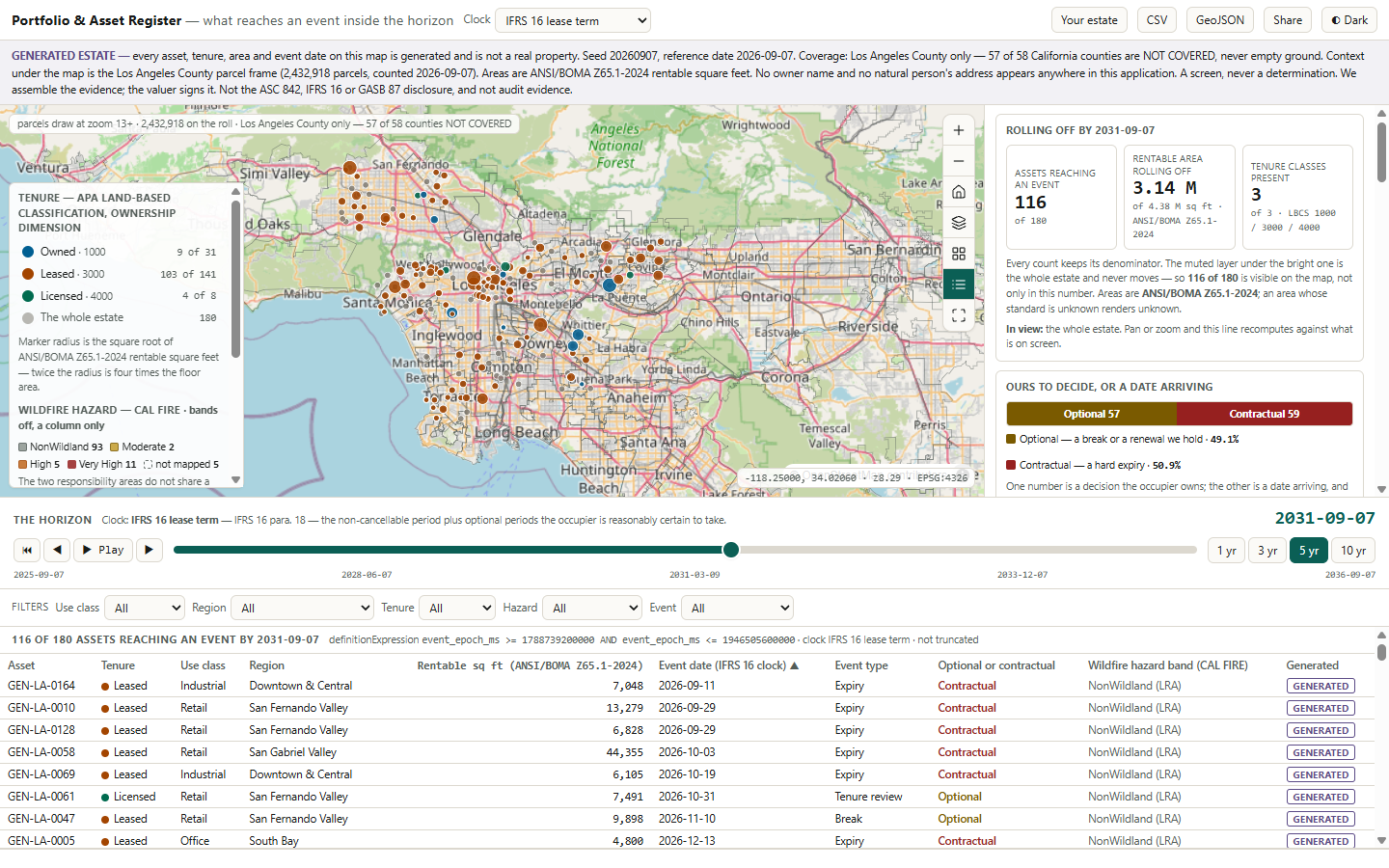
The Portfolio & Asset Register when it opens: the estate over Los Angeles County, the legend and summary panel beside it, the timeline slider below, and the property table under that.
Screenshot of the working app, September 2026.
  • A timeline slider runs along the bottom. Move it to set your horizon, for example five years from today.
  • A choice of rule: accounting or tax. The rule in use is printed on screen and on exports.
  • The whole estate stays on the map in a faint colour. Properties with an event before your date light up, coloured by tenure.
  • Counts always show the total, for example 116 of 180, so you never lose sight of the whole estate.
  • Owned, leased and licensed follow a published land-use classification (APA codes 1000, 3000 and 4000).
  • Click any property to see its dates. Filter by tenure or use, and share a link that opens the same view.
Worked example

How much space reaches an event, and where.

Instead of cash by year, the app shows how many properties reach a lease event by your chosen date, how much floor area that is, and where they are. It also splits them into events you control and events that simply arrive.

horizon 7 Sep 2031 · rule IFRS 16 lease term
116 of 180 properties reach an event = 64.4 %
3.14 M of 4.38 M sq ft, measured to the BOMA standard (ANSI/BOMA Z65.1-2024)
your option 57 · fixed expiry 59 = 49.1 % / 50.9 %

Two numbers, not one. A break option or a renewal gives you room to negotiate. A fixed expiry is a deadline. Adding them together hides the difference that matters most.

Planning horizonproperties reaching an event
1 yr32 of 180
3 yr76 of 180
5 yr116 of 180
10 yr161 of 180
These four horizons match the ones in the published federal lease benchmark, so the demo can be compared with real data. All 180 properties stay on the map at every step.
Press play to move the date forward, or use the arrow keys to step one month at a time. Figures come from the made-up demo estate.
Worked example: changing the rule

Same estate, same date, different rule.
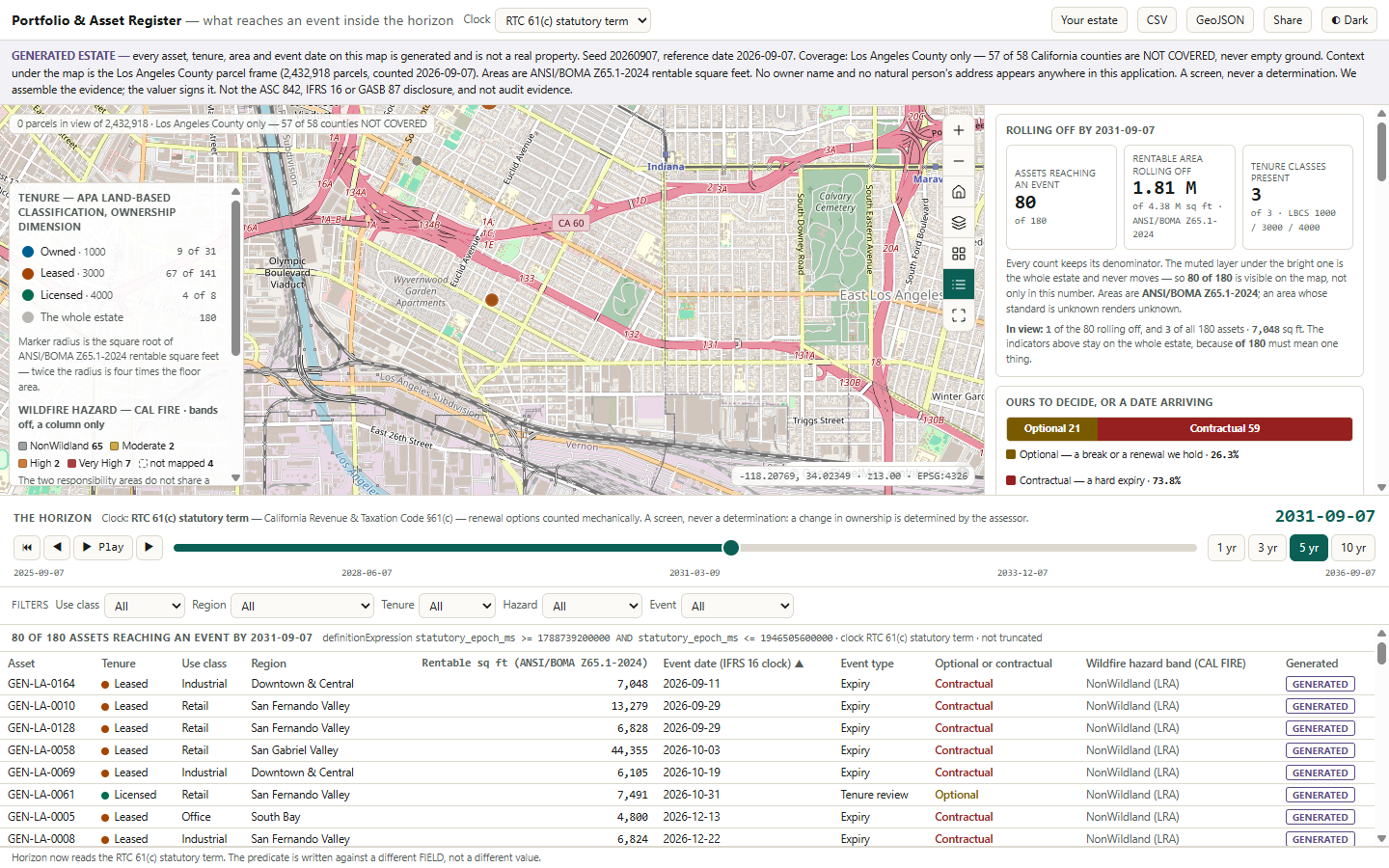
The same five-year horizon under the California tax rule: 80 of 180 properties and 1.81 million square feet, with the option-versus-fixed split moving to 26.3 against 73.8 per cent.
Switching the rule updates the counts, the split, the map and the legend together.
Accounting rule (IFRS 16)
116 of 180 · 3.14 M sq ft
Option 57Fixed 59
Tax rule (R&T § 61(c))
80 of 180 · 1.81 M sq ft
Option 21Fixed 59

36 properties and 1.33 million sq ft move, although nothing about the estate has changed. Fixed expiries are the same under both rules (59). Every property that moves has an option that the two rules treat differently.

A lesson from real lease data

Many break options are not real break options.

The US federal government publishes its list of leases. A break (termination) date is filled in on 7,367 of 7,368 leases. That suggests almost every lease has a break option. It does not.

1,299leases where the break date is the same as the expiry date, so there is no real break option
2,726more where the break date has already passed. That leaves 3,342 live break options.
767of 1,559 options within five years disappear after this fix. The option / fixed split moves from 43.4 / 56.6 to 26.5 / 73.5.

Why it matters: each date looks valid on its own. The problem only shows when you compare the break date with the expiry date. After the fix, more of the coming events are fixed deadlines than it first appeared.

With live break options identified, the app can show the first date you need to act. 5,100 of 7,133 current leases (71.5 %) reach that point within five years, carrying $3.29 bn of annual rent. Counting expiries only, as the accounting report does, gives 48.8 % and $2.56 bn. The 22.7-point gap is the live break options. The app shows both figures and the gap.

Why you can trust it

Where the data comes from, and how it is handled.

Your file stays with you

Your spreadsheet is opened inside your browser. It is not uploaded or stored on any server.

Personal data is removed

Owner, landlord and taxpayer names, personal names, mailing addresses and contacts are removed as soon as the file is read. The app lists the columns it removed.

Sample data is labelled

The 180-property Los Angeles estate is made-up sample data. It says so on the opening screen, the notice bar, every row, every pop-up and every export.

Real, published sources provide the land parcels, the county boundary, wildfire risk zones, the local employment mix and the federal lease list. Only the 180 demo properties are made up.

The app was tested with real files in a real browser before release, including checks that the sample-data labels switch off when you load your own estate.

Limits

What this app does not do.

  • It is not the accounts disclosure. No journal entries, no reconciliation to the balance sheet, and not audit evidence.
  • It is not a valuation. It gives no opinion of value. That stays with your valuer.
  • It is not your lease database. It reads your file but never changes or saves it. It runs on Strata Serve or ArcGIS.
  • It does not record decisions. You cannot mark a property as approved or sold. You take the view away as an export. Recording a status has been scoped but is not built.
  • It does not cover floor plans. No desks, layouts or occupancy sensors.
  • No owner names. These are removed from every file, including yours. You can keep such a column only by choosing to.
  • No money in the demo estate. Book value, rent and occupancy cost are left blank. The rent figures shown come from the published federal lease list.
  • The demo covers one county. Los Angeles is one of 58 California counties. The others show as "not covered", not as empty.
  • English only. No right-to-left languages.

These limits are also written into the app's own documentation. The tax-rule view is always labelled as a first check, not a ruling.

Use your own portfolio

Load your own property list in under a minute.

Press Your estate and choose a file from your computer: a CSV spreadsheet or a GeoJSON map file. The map, the counts and the timeline all switch to your properties. One button brings the demo back.

Two short steps

First, where each property is: an ID, a name, and coordinates or an address. Then what it is: tenure, use, floor area, lease expiry and break date. The app guesses each column and you can correct it from a list.

Personal columns are removed

Owner, landlord and other personal columns are removed before anything else happens. The app shows you which ones.

Gaps are counted, not filled

A property with no location is listed but not mapped. One with no date is left off the timeline and counted. Nothing is made up.
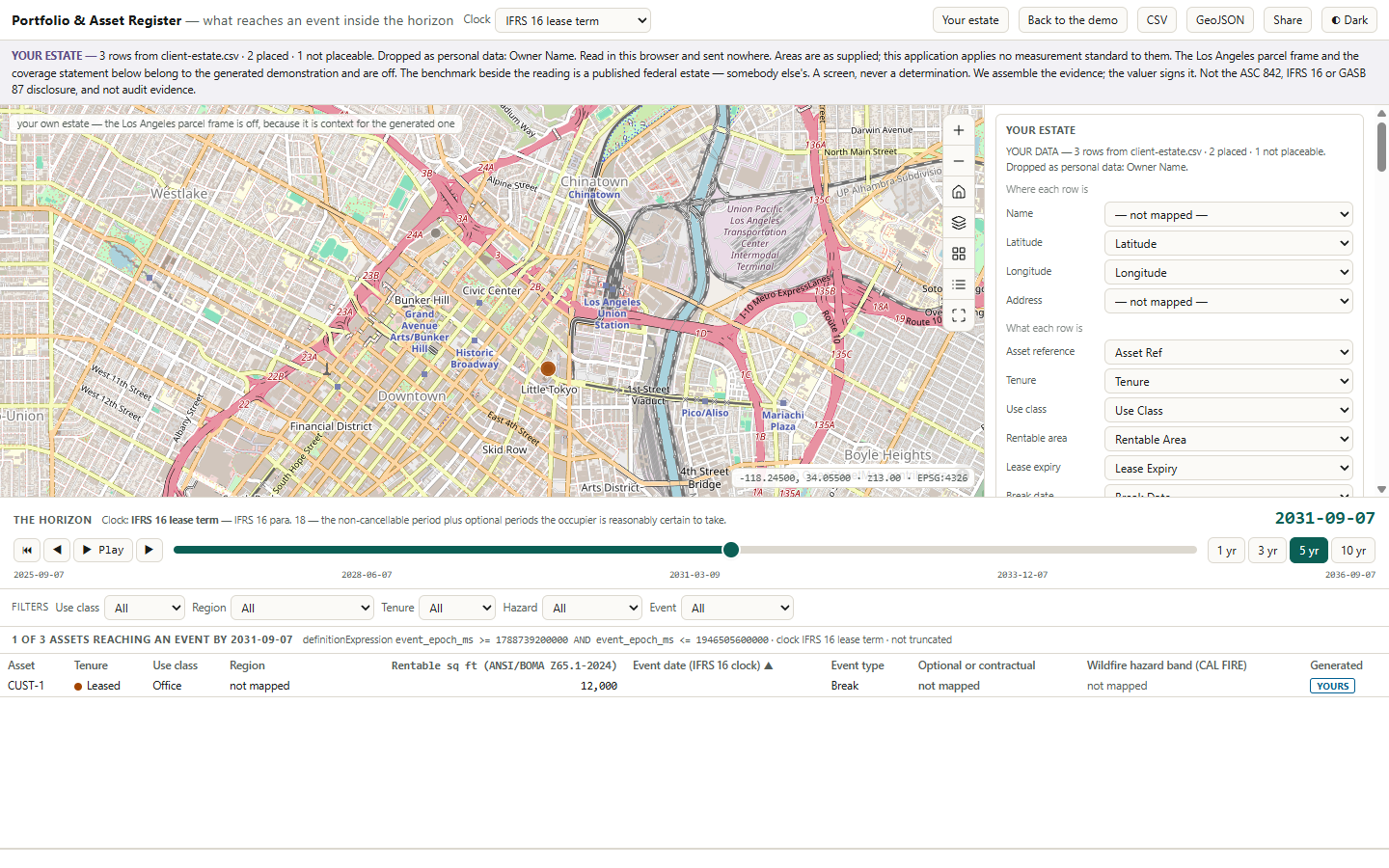
A three-row file loaded: the notice bar reads YOUR ESTATE and names the removed column, the column choices sit in the side panel, and the table row is marked YOURS.

A three-property test file. The notice bar says YOUR ESTATE and names the removed column. One of the three properties falls inside the horizon.

Your file never leaves your browser. Nothing is uploaded or kept on a server. The Los Angeles parcel layer switches off for your data, because your properties may be in Riyadh or Leeds.

Next step

Bring your property list
to the meeting.

All you need is a list of what you own and lease, with a location, tenure, floor area and the key lease dates your team already uses. We open it on your laptop in the room. Nothing is sent anywhere.

It adapts to your market. The map layers and the risk data are changed in settings, without new code. The timeline and the tenure view are not tied to US rules. If you already run a lease system, you can feed your own data in and keep it.

tabaqat.net → Solutions → Real Estate info@tabaqat.net
© 2026 Tabaqat · Built on Strata. The demo estate is made-up sample data for Los Angeles County. Your own file replaces it in your browser. For analysis only: not a lease database, not the lease-accounting disclosure and not a tax ruling.
1 / 12